
Bakesy: Home Bakery Biz App
BakesyBusiness
4.6191.00 Reviews
- Version
- 3.3.11
- Installs
- 100.00K
- Age Rating
- Everyone
Screenshots

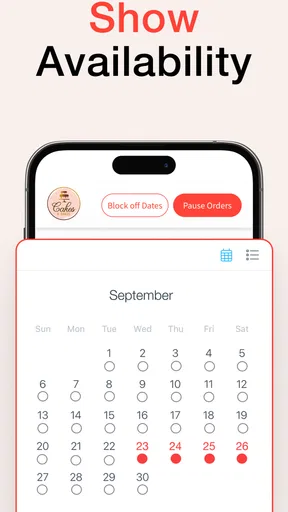
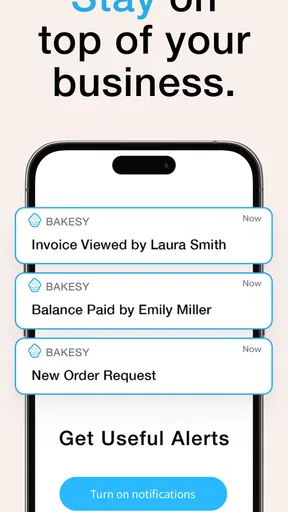

Our Review of Bakesy: Home Bakery Biz App
 Analysis by Appyee
When a home bakery starts receiving regular requests, the hardest part is often not the baking itself. It is remembering which customer needs which cake, when an order is due, whether a special request was confirmed, and what the ingredients cost. I’ve found that the admin can spread across messages, notes, and a calculator surprisingly quickly. Bakesy: Home Bakery Biz App is aimed at bringing that work together, so the useful question is whether it makes a baker’s day simpler without creating a new system to babysit.
It is a business app from Bakesy, available for free, with optional in-app purchases priced from $9.99 to $17.99 per item. It has a 4.7 average from over 800 ratings, and more than 100,000 installs. Those figures suggest it has reached a meaningful audience of small baking businesses, though they don’t tell me whether its workflow suits every baker. I’d judge it by how well it fits the way you actually take orders and plan production.
Getting Started with Bakesy
First things first, downloading and setting up Bakesy is a breeze. The app is available for both Android and iOS, so regardless of your device, you're good to go. Once installed, you're greeted with a clean and intuitive interface, which is a relief because who wants to deal with complicated tech stuff when you have dough to knead, right?
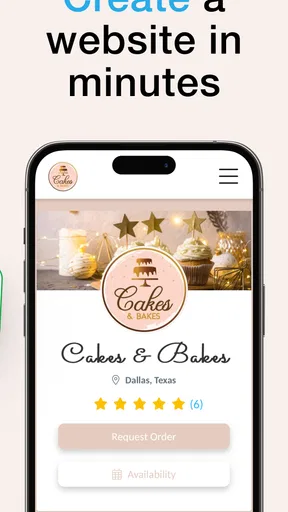
Setting up your profile is straightforward. You can add details about your bakery, set your location, and even customize your logo. The app lets you showcase your baking creations with a portfolio section, which looks pretty slick and professional. It's perfect for attracting new customers who might want to drool over your delicious offerings before placing an order.
Order Management Made Easy
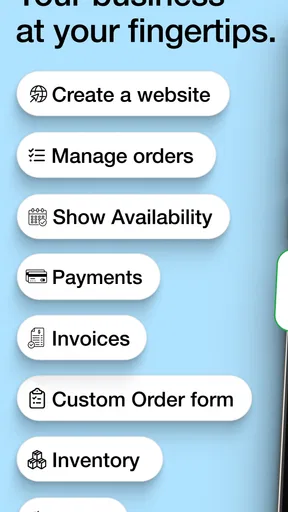
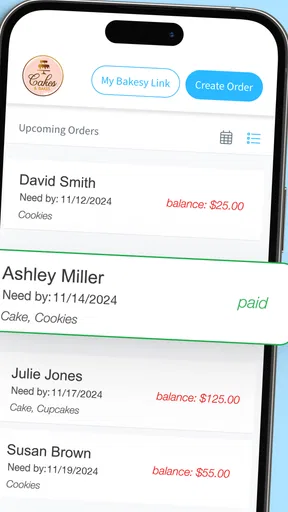
One of the standout features of Bakesy is its order management system. As someone who can get a little scatterbrained during a baking frenzy, this feature is a lifesaver. You can track orders from start to finish, manage delivery schedules, and even send invoices. It’s like having a personal assistant who keeps everything organized so you can focus on what you do best—baking!
What's more, the app automatically calculates costs and profits for each order, which is super handy. No more scribbling numbers on a notepad and accidentally forgetting to factor in the cost of those fancy sprinkles.
Connecting with Customers
Bakesy doesn’t just stop at helping you manage orders. It takes customer interaction to a whole new level. You can communicate directly with your customers through the app, making it easy to confirm orders, discuss special requests, or just chat about how awesome your cupcakes are. This feature helps in building a strong rapport with your clients, and let's face it, a happy customer is a returning customer!
The app also allows you to create promotional campaigns. Whether it’s a seasonal discount or a special offer for loyal customers, Bakesy gives you the tools to entice your customers with tempting deals. It’s a nifty way to keep your bakery on their radar.
Inventory and Expense Tracking
Another feature that really caught my attention is the inventory management system. Keeping tabs on ingredients can be a nightmare, but with Bakesy, you can track your stock levels effortlessly. The app even sends you alerts when it’s time to restock, preventing those last-minute dashes to the store.
In addition, Bakesy offers an expense tracking feature. You can log every expenditure, from purchasing flour to those cute little cupcake liners. The app provides a clear overview of your expenses, so you always know where your money is going. It’s a fantastic way to ensure your business stays profitable.
Pricing and Accessibility
Let’s talk about the cost. Bakesy is free to download, with optional in-app purchases ranging from $9.99 to $17.99 per item. The app is rated for Everyone and was released on July 20, 2021. Its current version is 3.2.13, and it supports devices running version 7.0 or later. I’d check the purchase options in the app before building a routine around a paid feature, since the free entry point and optional purchases make it worth understanding what you actually need.
The app is also designed to be accessible and user-friendly. Even if you’re not a tech whiz, you’ll find navigating through Bakesy to be as easy as pie—or should I say, cake?
Putting the Workflow to Work
A useful way to approach setup is to enter only the information that helps you make the next decision. Add the bakery details and examples of your work, then try recording a typical order from inquiry through completion. This small test shows whether your customer conversations, deadlines, and costing can live comfortably in one place before you move every active customer over.
For a custom birthday cake, for example, I’d record the request, clarify the design and pickup or delivery timing in the customer conversation, then keep the order’s cost and profit estimate alongside it. The practical benefit is not just tidier records: it reduces the chance that a design detail gets buried in a long message thread while the production date approaches. I’d still confirm important details with the customer in plain language rather than assuming a note or estimate is their final approval.
There is also a useful distinction between tracking stock and planning a recipe. Inventory alerts can help prompt a restock, but they are only as useful as the quantities you keep current. If you buy ingredients for both household use and bakery orders, or use ingredients across many recipes, a quick regular review is safer than treating the app’s stock view as an automatic count of what is physically on your shelves.
Where It Fits Among Small-Business Tools
Compared with a notebook, spreadsheet, and separate messaging app, Bakesy’s appeal is having order handling, customer contact, and business records in a bakery-focused workflow. A spreadsheet can be more flexible for unusual costing rules, and a notebook may be faster for a baker who takes only occasional orders. But those options rely on you to connect the pieces yourself. When several orders overlap, having the customer and order details together can be worth more than the freedom of a blank spreadsheet.
It is not automatically the right choice for every food business. A baker who already runs a larger operation with staff, complex production planning, or accounting routines may prefer dedicated tools built around those needs. Likewise, if most sales happen through an established storefront or a platform that already manages customer orders, adding another place to maintain information could create extra work rather than remove it. I’d use Bakesy as the central workflow only if it genuinely replaces scattered steps.
Small Habits That Make the Difference
One practical habit is to treat the order record as the source of truth: after agreeing on a change in a conversation, update the order details straight away. That avoids relying on memory when several customers are discussing flavors, decorations, or timing at once. Another is to enter costs consistently, including small extras that are easy to overlook. A profit estimate is only useful if the inputs reflect the real order rather than just the main ingredients.
Promotions are most helpful when they have a clear purpose, such as filling a quieter period or encouraging repeat orders. I would avoid creating offers simply because the feature is available: a discount can bring attention, but it also changes the amount you earn on each bake. Check the cost of the product first, and make sure the campaign still makes sense for your time and ingredients.
Limits to Consider Before Committing
The convenience of an all-in-one tool comes with a maintenance trade-off. Orders, stock, and expenses still need accurate updates from the person running the bakery; the app can organize information, but it cannot know that you used the last bag of flour or agreed to move a pickup unless you record the change. A baker who dislikes keeping digital records may find that the system becomes another task rather than a time-saver.
I would also be cautious about treating an automatic cost or profit figure as a complete business analysis. It can help compare an order’s recorded costs with its price, but decisions about labor, waste, packaging, and delivery depend on how carefully you account for them. For a new business, that makes the feature a helpful prompt to price thoughtfully, not a substitute for checking whether the overall business model works.
Who Is Likely to Get the Most From It?
I can see the strongest fit for a solo home baker whose orders arrive through several conversations and whose weekends are busy enough that a missed detail matters. It is especially appealing if you want customers to see a polished bakery profile while you keep orders, invoices, expenses, and ingredients in a more organized routine. A baker who is still testing whether anyone will buy their work may be better off starting with a simple recordkeeping method and moving to a dedicated app when the admin becomes a real burden.
If you are deciding whether to pay for anything, first use the free download to understand your own workflow, then identify which task is costing you the most attention. If order tracking is the problem, test that part with a few real orders. If the value depends on a purchase, compare its cost with the time or mistakes it could reasonably save you. That is a more useful test than subscribing because an app appears to have a feature for every part of a bakery business.
Final Thoughts
In a nutshell, Bakesy: Home Bakery Biz App is a focused option for anyone serious about organizing a home bakery. Its strength is the possibility of bringing customer conversations and order administration closer to the practical work of baking, while cost, stock, and expense tools can help you keep an eye on the business behind each treat. I like the idea most for a baker who has outgrown informal notes but does not want to piece together several general-purpose apps.
It will not remove the need to confirm custom requests, keep records current, or think carefully about pricing. Nor is a bakery-specific app automatically better than a spreadsheet if your operation is unusual or already well organized. But if scattered messages and forgotten details are taking time away from production, Bakesy is worth trying as a way to bring that routine into one place. I’d start with a small batch of orders, see whether the workflow feels natural, and expand only if it genuinely makes the busy days calmer.
Verdict
Strengths of Bakesy: Home Bakery Biz App
- User-friendly interface for easy navigation.
- Comprehensive order management system.
- Built-in marketing tools enhance visibility.
- Customizable menus for personalized branding.
- Supports multiple payment options securely.
Limitations of Bakesy: Home Bakery Biz App
- Limited customization for notifications.
- No offline mode for order management.
- Occasional sync issues with calendar.
- Requires constant updates for new features.
- In-app purchases can be pricey.
Similar Picks in This Category
View All
LinkedIn: Community & Network
LinkedIn3.8

Zoom Workplace
zoom.com4.1

Microsoft Teams
Microsoft Corporation4.6

Meta Business Suite
Meta Platforms, Inc.4.6

Webex Meetings
Cisco Systems, Inc.4.5

TeamViewer Remote Control
TeamViewer4.4
Frequently Asked Questions
What is Bakesy and how does it help home bakers?
Bakesy is a comprehensive app designed for home bakers looking to manage and grow their baking business. It offers tools for order management, scheduling, and customer communication. Users can easily track their inventory, set up a digital storefront, and handle payments, making it a one-stop solution for all bakery business needs.
Is Bakesy user-friendly for beginners in the baking business?
Yes, Bakesy is designed with an intuitive interface that is accessible for users of all skill levels. The app provides step-by-step guidance and tutorials to help beginners set up their profiles, manage orders, and use its features effectively. Its simple layout ensures that even those new to digital tools can navigate it with ease.
Can I customize my storefront on Bakesy to match my brand?
Absolutely. Bakesy offers a range of customization options for your digital storefront. You can upload your own logo, choose from various themes, and showcase your products with detailed descriptions and high-quality images. This allows you to create a unique brand identity that resonates with your target audience.
Does Bakesy support multiple payment options?
Yes, Bakesy supports a variety of payment methods to ensure convenience for both bakers and their customers. You can accept payments through credit cards, PayPal, and other popular payment gateways. The app also provides secure transaction processing to protect both parties' financial information.
What kind of customer support does Bakesy offer?
Bakesy provides comprehensive customer support through multiple channels. Users can access a dedicated help center with FAQs, video tutorials, and community forums. For more personalized assistance, the app offers email support and live chat with customer service representatives, ensuring that any issues are resolved quickly and efficiently.
